Synchronizer Token Pattern
Previously in my last blog post (Cross Site Request Forgery) I discussed
about what is CSRF attack on Web Applications and today I am going to explain
the Synchronizer Token Pattern in this blog post as one of
the identified solutions for this CSRF security attack.
Now let's assume all the state changing
operations are done through POST, PUT, DELETE requests and anyway session
cookie is going with these requests. But assume we expect user to send some
specific token along with the request and only if that token is received
Facebook server will validate the token and allow the request to be processed.
Synchronizer Token Pattern is used this
security token method to prevent form the CSRF attack on Web Applications.
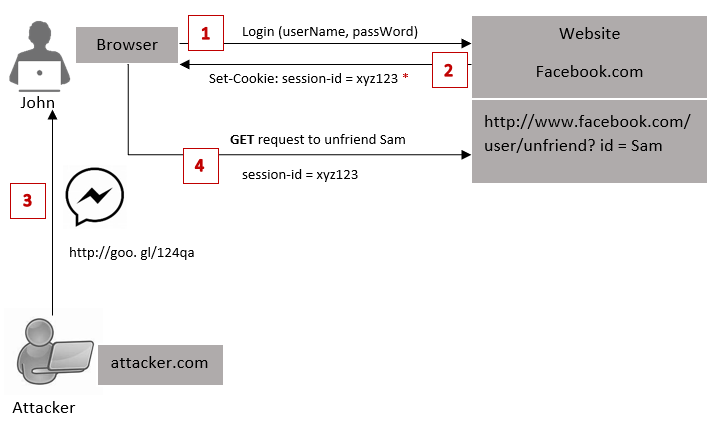
Following diagram will simply show how this security pattern works.

As the diagram shows, let's say John needs to log in to
Facebook and he enters his account credentials (username and password). After
John entering his credentials, server will authenticate the user and create a
Session Id for the particular session. Additionally what happens in
Synchronizer Token Pattern is, server generates a random token which we
call as a CSRF token. At the login process server will generate, store and keep
this token at server side in the user session. Browser even does not know
anything about this CSRF token. Only Session Id will come along with the
session cookie and store at the browser's cookie storage.
Now user is logged in successfully and browser has the session id. Let say John wants to update his status on Facebook and he browses that update status page. Then this request is sent to the sever and there the session cookie goes, so server knows that is john who is logged in.Then server sends the response updateStatus.html page in return.
Now what happens is, let say that HTML page has some text box and a button where user can type the status and clicks on the button, that will send a POST request for getting the status updated. When that HTML page get rendered in the browser, internally this page knows that it has a form and some JavaScript (JS). That JavaScript knows there is a HTML form and user will make some POST request. So, what that JS does is, when this page loads in the browser, that will make an Ajax request to some URL (facebook.com/getToken) in the website. This Ajax call contains the session cookie. Hence along with that request session id will go because the path and domain is matched. So server knows this is a valid user who is making the request after checking the session id. Then server will send the corresponding CSRF token along with the response of that Ajax call. This whole process is done by JS embedded into the page.
When JS receives the CSRF token, it modifies the DOM (Document Object Model), get the source and embed a hidden field on from submit. User doesn't see this is happening when page loads. So, user types the status and click on the submit button. It will send another POST request to update the status of the page. With this request, session cookie, status value in the body and the CSRF token also go. Now server receives this request. Whenever POST, PUT or DELETE request comes server knows that it needs to protect the token. So first server will check the cookie is received in the header. Then server checks is it a legitimate cookie or John is a valid user. After that it checks the request body and get the CSRF token. Then sever checks if that token matches with the previously stored session's token. If it matches only John is a legitimate, the request will be satisfied and status will get update. Simply this is how Synchronizer Token Pattern works on Web Applications.
Will an attacker able to perform this??
In a scenario like, if the attacker creates his own website (e.g. attacker.com) would attacker be able to make an AJAX call and get the CSRF token ? From attacker.com to facebook.com/getToken, is a cross domain AJAX call where actual user and attacker in two different domains. By default cross domain AJAX calls are not possible. So this attackers's call will fail and an attacker will not be able to obtain the CSRF token. Since the token is unavailable in the request body, the server will not complete the action. Therefore CSRF is prevented.

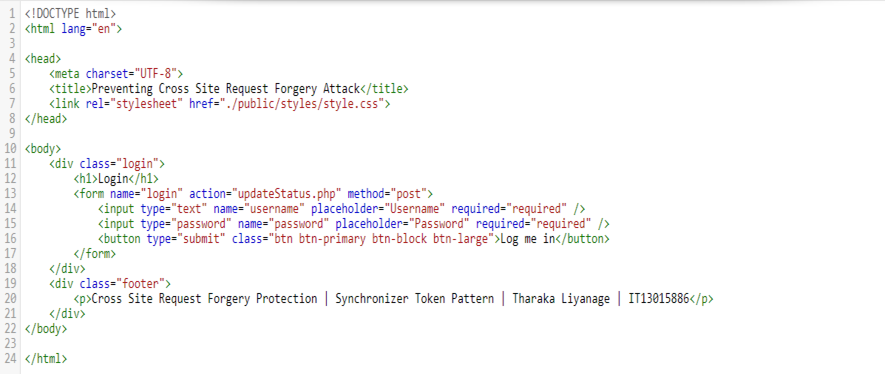
This login form submits user credentials through a POST method. At the login process, if the user is authenticated, unique Session Id and the CSRF token will be created along with this session. Upon login, generated session identifier set as a cookie in the browser and at the same time, this CSRF token is stored against the session identifier at server side. For the demonstration purpose here I store CSRF token in a text file called Token.txt.


Now user is logged in successfully and browser has the session id. Let say John wants to update his status on Facebook and he browses that update status page. Then this request is sent to the sever and there the session cookie goes, so server knows that is john who is logged in.Then server sends the response updateStatus.html page in return.
Now what happens is, let say that HTML page has some text box and a button where user can type the status and clicks on the button, that will send a POST request for getting the status updated. When that HTML page get rendered in the browser, internally this page knows that it has a form and some JavaScript (JS). That JavaScript knows there is a HTML form and user will make some POST request. So, what that JS does is, when this page loads in the browser, that will make an Ajax request to some URL (facebook.com/getToken) in the website. This Ajax call contains the session cookie. Hence along with that request session id will go because the path and domain is matched. So server knows this is a valid user who is making the request after checking the session id. Then server will send the corresponding CSRF token along with the response of that Ajax call. This whole process is done by JS embedded into the page.
When JS receives the CSRF token, it modifies the DOM (Document Object Model), get the source and embed a hidden field on from submit. User doesn't see this is happening when page loads. So, user types the status and click on the submit button. It will send another POST request to update the status of the page. With this request, session cookie, status value in the body and the CSRF token also go. Now server receives this request. Whenever POST, PUT or DELETE request comes server knows that it needs to protect the token. So first server will check the cookie is received in the header. Then server checks is it a legitimate cookie or John is a valid user. After that it checks the request body and get the CSRF token. Then sever checks if that token matches with the previously stored session's token. If it matches only John is a legitimate, the request will be satisfied and status will get update. Simply this is how Synchronizer Token Pattern works on Web Applications.
Will an attacker able to perform this??
In a scenario like, if the attacker creates his own website (e.g. attacker.com) would attacker be able to make an AJAX call and get the CSRF token ? From attacker.com to facebook.com/getToken, is a cross domain AJAX call where actual user and attacker in two different domains. By default cross domain AJAX calls are not possible. So this attackers's call will fail and an attacker will not be able to obtain the CSRF token. Since the token is unavailable in the request body, the server will not complete the action. Therefore CSRF is prevented.
Now lets move into the sample application developed for explain this security pattern.
Sample Application
Sample Application
This sample application is developed using PHP and you can find the uploaded Github source code from here .
The application is mainly consists of three main screens which are login page, update status page and updated results page. Now starting from the login page let's discuss the implementation flow of the Synchronizer Token Pattern using this simple application.
The login page is as follows. First you need to login to the application by entering username and password. For the demonstration purpose here I have hard coded the credentials. You can enter user credentials as follows.
Username: admin
Password : admin
index.html
This login form submits user credentials through a POST method. At the login process, if the user is authenticated, unique Session Id and the CSRF token will be created along with this session. Upon login, generated session identifier set as a cookie in the browser and at the same time, this CSRF token is stored against the session identifier at server side. For the demonstration purpose here I store CSRF token in a text file called Token.txt.
updateStatus.html
Here, what internally happens is, updateStatus.html contains the simple PHP code snippets to validate the user credentials. Then it makes an Ajax call to generate the CSRF token to csrf_token_generator.php. This Ajax call contains the session id and upon the Ajax call, server will send the corresponding CSRF token along with the response. This is where token embeds into a hidden field on form submit. User doesn't see this is happening when page loads. So, user types the status and click on the Update button. It will send another POST request to update the status of the page.
In below screen you can observe the CSRF token value has been added to the hidden field when the form loads.
csrf_token_generator.php
This php file is used to generate the CSRF token and it sets corresponding the session id. Here, openssl_randon_pseudo_bytes() is used to generate the 32bit long csrf token. In order to use this function you have to have openssl installed. Otherwise it will give you an error. The generated value then converted into it's base64 value using base64_encode() function in order to make it more secure.
The POST request that user makes to update the status contains this generated CSRF token and the session cookie. Then server checks the cookie header for session id and request body for get the CSRF token.
Then server calls checkToken() function to confirm whether the token is matched or not with previously stored session's token. In this sample application token.php is contained this check function which takes csrf token and session id as two input parameters and return true if the received parameters are matching with the values that are stored previously in Token.txt.
token.php
Tokens.txt
To explain you to more, here I will show you two alerts containing the session id and CSRF token coming with the update status POST request. You can see those two are matching with session id and CSRF token stored inside the Token.txt.
Now let's look at how we can observe updated status. Here, results.php is the place where this checkToken() function is invoked and display the updated status upon the token validation.
results.php
You can find the full implementation of this sample application at,
https://github.com/TharakaMadushanki/Prevent-CSRF-Attack---Synchronizer-Token-Pattern
Drawback of the Synchronizer Token Pattern is server has to keep and store all the tokens.Imagine there are one billion of users, then the server storage needs to store one billion of record or even more, because one user can have multiple sessions.
In my next blog post, I will be discussing how Double Submit Cookie pattern is used to prevent from the CSRF attack and you can find it from here.
https://github.com/TharakaMadushanki/Prevent-CSRF-Attack---Synchronizer-Token-Pattern
Drawback of the Synchronizer Token Pattern is server has to keep and store all the tokens.Imagine there are one billion of users, then the server storage needs to store one billion of record or even more, because one user can have multiple sessions.
In my next blog post, I will be discussing how Double Submit Cookie pattern is used to prevent from the CSRF attack and you can find it from here.